
Download Prompt Hunt – AI‑Art Creation Platform, Free Templates & Secure Cloud
Overview of Prompt Hunt
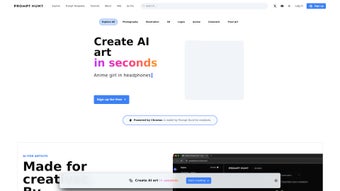
Prompt Hunt is a next‑generation AI‑art creation platform that brings together the most popular generative models—Stable Diffusion, DALL·E, and Midjourney—under a single, browser‑based interface. Designed for both seasoned digital illustrators and casual hobbyists, the service lets users generate high‑quality images in seconds while maintaining full control over artistic direction. The platform’s signature feature, **Chroma**, replaces the traditional trial‑and‑error approach to prompt engineering with an intuitive set of sliders that adjust hue, saturation, contrast, lighting, and detail level.
This visual control panel allows creators to fine‑tune results without rewriting complex text prompts, dramatically reducing the time spent on iteration. In addition to Chroma, Prompt Hunt offers a curated library of thousands of ready‑made prompt templates covering characters, landscapes, UI elements, product mock‑ups, and more. These templates serve as a rapid‑start toolkit for repetitive asset production, ensuring consistency across large projects or collaborative teams.
A clean drag‑and‑drop canvas lets users layer generated images, import reference files, and apply masks or blending modes directly within the browser. For privacy‑concerned creators, a built‑in Privacy Mode hides drafts from the public gallery until you decide to publish or export them. Prompt Hunt also includes a comprehensive Learning Hub with video tutorials, step‑by‑step guides, and live webinars that cater to all skill levels.
Whether you are learning the basics of AI‑generated art or exploring advanced techniques, the educational resources help you get the most out of the platform. Flexible pricing plans—ranging from a free tier with limited daily credits to premium subscriptions with unlimited renders—ensure that artists, marketers, and developers can access powerful AI tools without breaking the bank. Secure cloud storage safeguards every project, and the service is continuously updated with the latest model improvements, keeping your workflow future‑proof.
Key Features, Pros & Cons
Prompt Hunt’s power lies in its comprehensive feature set that blends cutting‑edge AI capabilities with a user‑friendly workflow. Below is a detailed look at what makes the platform stand out, followed by an unbiased assessment of its strengths and weaknesses. Whether you are evaluating Prompt Hunt for personal use or as a team solution, this overview provides the context you need to decide if it fits your creative pipeline.
- Multi‑model support: Seamlessly switch between Stable Diffusion, DALL·E, and Midjourney without leaving the dashboard.
- Chroma control engine: Visual sliders let you adjust hue, saturation, contrast, lighting, and detail in real time.
- Extensive prompt template library: Hundreds of pre‑built prompts for characters, environments, UI assets, and more.
- Drag‑and‑drop canvas: Combine generated elements, upload reference images, and arrange layers visually.
- Privacy mode: Keep drafts hidden from the public gallery until you’re ready to share.
- Learning hub: Video tutorials, written guides, and live webinars for every skill level.
- Flexible pricing: Free tier, pay‑as‑you‑go credits, and monthly/annual subscriptions.
- Secure cloud storage: Projects are saved in encrypted cloud storage and accessible from any device.
Pros
- All‑in‑one access to the three leading AI art models eliminates the need for multiple accounts.
- Chroma’s visual controls dramatically reduce the time spent on prompt iteration.
- Rich template library accelerates repeatable asset creation and maintains stylistic consistency.
- Intuitive UI lowers the learning curve for newcomers while still offering depth for experts.
- Privacy mode protects intellectual property during the early stages of a project.
- Scalable pricing accommodates freelancers, agencies, and large enterprises alike.
- Cloud‑based storage ensures projects are safe, backed up, and accessible on any platform.
Cons
- High‑resolution renders consume more credits, which may require a paid plan for power users.
- Requires a stable internet connection; offline work is not possible.
- Some advanced Midjourney parameters are simplified, potentially limiting expert‑level customization.
- Free‑tier users may experience longer queue times during peak usage periods.
- Exporting very large files can be slower due to server‑side processing.
Installation, Usage Instructions & Compatibility
Prompt Hunt is delivered as a fully web‑based SaaS solution, which means there is no traditional software download or installation process. Getting started is as simple as creating an account and choosing a plan, after which you can begin generating artwork directly from your browser. Below is a step‑by‑step guide that walks you through account creation, project setup, and best practices for efficient usage.
- Create an account: Visit prompthunt.com, click “Sign Up,” and verify your email address. You can also log in instantly with Google or Apple ID.
- Select a pricing tier: Choose the free tier to explore basic features, or upgrade to a paid subscription for unlimited credits and higher‑resolution renders. Credit packs are also available for one‑off projects.
- Pick a generative model: From the dashboard, select Stable Diffusion, DALL·E, or Midjourney. Each model displays its credit cost per image before you generate, helping you manage budget.
- Choose or craft a prompt: Browse the prompt template library, click “Apply,” and edit the text as needed. For custom ideas, type directly into the prompt field.
- Fine‑tune with Chroma: Open the Chroma panel and adjust sliders for color balance, lighting direction, and detail intensity. Real‑time previews let you see changes instantly.
- Compose on the canvas: Drag generated images onto the canvas, add additional layers, or upload reference files. Use masking, blending modes, and layer ordering to create complex compositions.
- Collaborate (optional): Invite teammates to a shared workspace. Set permissions to “view only,” “comment,” or “full edit” to streamline group projects.
- Save and protect your work: Click “Save” to store the project in your secure cloud library. Enable Privacy Mode to keep drafts hidden until you’re ready to publish.
- Export your final asset: Download the completed image in PNG, JPEG, or SVG format. Higher‑resolution exports require more credits, so check your balance before exporting.
Compatibility: Because Prompt Hunt runs entirely in the browser, it works on any modern operating system, including Windows 10/11, macOS Monterey and later, Linux distributions with up‑to‑date browsers, as well as Android and iOS devices. The platform supports Chrome 108+, Firefox 102+, Safari 15+, and the latest versions of Edge. No additional plugins or extensions are required, making the service truly cross‑device and future‑proof.
For teams that need real‑time collaboration, Prompt Hunt’s shared workspace allows multiple users to edit the same canvas simultaneously. Changes are synced instantly, and version history lets you revert to earlier states if needed. This makes the tool ideal for design studios, marketing agencies, and development teams that rely on rapid visual iteration.
FAQ & Conclusion – Should You Download Prompt Hunt?
Is Prompt Hunt really free to use?
Yes. Prompt Hunt offers a free tier that provides a limited number of daily credits for low‑resolution renders. This tier is perfect for testing the platform, learning the interface, and creating small personal projects. For higher‑resolution images or larger volumes, you’ll need to upgrade to a paid plan or purchase additional credit packs.
Can I use Prompt Hunt offline?
No. Prompt Hunt relies on cloud‑based AI models that run on remote servers. An active internet connection is required to send prompts, receive generated images, and store projects in the cloud. Once an image is exported, you can work with it offline using any image editor.
How does the Chroma control differ from standard prompt tweaking?
Traditional prompt tweaking involves rewriting textual descriptions, which can be time‑consuming and unpredictable. Chroma replaces much of that guesswork with visual sliders that directly adjust color, contrast, lighting, and detail levels. Changes are previewed instantly, allowing you to converge on the desired look in just a few clicks rather than multiple prompt iterations.
Are my generated artworks private?
Prompt Hunt includes a Privacy Mode that keeps drafts hidden from the public gallery. By default, only you and any collaborators you invite can view the project. When you’re ready to share, you can toggle visibility to public or export the image to keep it completely offline.
What file formats can I export?
Prompt Hunt supports PNG, JPEG, and SVG exports. PNG is ideal for lossless quality and transparency, JPEG works well for web‑optimized images, and SVG is available for vector‑compatible outputs when the underlying model supports scalable graphics.
Prompt Hunt delivers a powerful, all‑in‑one environment for AI‑driven visual creation. Its integration of the three leading generative models, the intuitive Chroma control panel, and a massive library of prompt templates make it a standout choice for artists, marketers, and developers alike. The browser‑based architecture guarantees cross‑device compatibility, while the built‑in privacy mode and secure cloud storage protect your intellectual property. Although high‑resolution renders consume credits and offline use isn’t possible, the flexible pricing structure means you can start for free and scale as your needs grow. If you’re searching for a secure, feature‑rich AI art tool that balances ease of use with professional depth, Prompt Hunt is definitely worth downloading and testing.
Ready to elevate your creative workflow? Sign up for Prompt Hunt today and start generating stunning AI art in minutes.



.png)



